TAB and scoreboard: how to style the tab list on a Minecraft server
Configuring NEZNAMY's TAB plugin: the tab list header and footer, LuckPerms prefixes, a sidebar scoreboard, colors and animations. With config examples and why the scoreboard won't show up.
Players look at the Tab list and the sidebar scoreboard all the time. A bare tab with plain names gives away a server that was thrown together in one evening. NEZNAMY's TAB plugin handles all of it: the header and footer, prefixes and player order, the scoreboard, names above heads. Here are the main sections and the places where things usually break.
Where things live
| File | What's in it |
|---|---|
plugins/TAB/config.yml | header and footer, scoreboard, name tags, sorting |
groups.yml | prefixes and suffixes per group |
users.yml | the same for individual players |
animations.yml | animated text |
After any edit: /tab reload. No server restart needed.
TAB is actively developed, and config sections have been renamed and moved between major versions. The examples below show the logic. If a key in your file is named differently, go by the file the plugin generated on first start.
Header and footer
header-footer:
  enabled: true
  header:
  - '<#FFD60A>&lMYSERVER</#FF8A00>'
  - '&7Online: &f%online%'
  - ''
  footer:
  - ''
  - '&7Ping: &f%ping% ms'
  - '&7Website: &fmyserver.com'
%online% and %ping% are built into TAB, nothing else to install. PlaceholderAPI placeholders work too, as long as PAPI and the right expansion are installed.
Colors: the usual codes &a, &l, HEX like #FFD60A, and gradients as <#start>text</#end>. HEX and gradients are visible to 1.16+ clients.
Group prefixes
If your prefixes are already set in LuckPerms, don't duplicate them in TAB. Pull them in with a placeholder, and one edit updates both chat and tab. In groups.yml:
_DEFAULT_:
  tabprefix: '%luckperms-prefix%'
  tagprefix: '%luckperms-prefix%'
  tabsuffix: '%luckperms-suffix%'
  tagsuffix: '%luckperms-suffix%'
admin:
  tabprefix: '&c[Admin] &f'
tabprefix is for the tab list, tagprefix for the name above the head. _DEFAULT_ applies to every group without its own entry. Setting up groups and prefixes is covered in our LuckPerms guide.
Player order in the list is set in the sorting section, for example by a list of groups from owner down to regular players. Without it TAB sorts its own way, and your admin may end up at the bottom.
The sidebar scoreboard
scoreboard:
  enabled: true
  toggle-command: /sb
  scoreboards:
    main:
      title: '<#FFD60A>&lMYSERVER</#FF8A00>'
      lines:
      - '&7Name: &f%player%'
      - '&7Balance: &f%vault_eco_balance_formatted%'
      - ''
      - '&7Online: &f%online%'
      - '&emyserver.com'
The main trap: on a fresh install the scoreboard is off, enabled: false. You edit the lines, reload, and see nothing. Turn the section on.
A scoreboard holds at most 15 lines, a limit of the game itself. TAB can hide the red numbers on the right for 1.20.3+ clients. Different scoreboards per world use display-condition, for example '%world%=world_nether'. The balance line uses the Vault expansion for PlaceholderAPI.
Animations
In animations.yml:
logo:
  change-interval: 400
  texts:
  - '&e&lMYSERVER'
  - '&6&lMYSERVER'
  - '&f&lMYSERVER'
The interval is in milliseconds and should be a multiple of 50. Use the animation in the tab or scoreboard with %animation:logo%. Go easy: a ten-frame blinking header gets annoying within two minutes.
Common mistakes
- The scoreboard never shows. The section is off by default, see above.
- The tab or scoreboard flickers. Two plugins are writing it: TAB plus a separate scoreboard plugin, or a chat plugin that also renames players in the list. Keep one source.
- A placeholder shows as text. PlaceholderAPI is missing, the expansion isn't downloaded, or there's a typo.
- The wrong prefix. The player has several groups, and the one with the higher LuckPerms priority wins. Check priorities.
- The name above the head won't change. Another plugin already controls player teams and fights TAB for the same spot.
- The gradient looks like mush. Clients older than 1.16 can't see HEX. Keep plain codes for old versions.
- A line gets cut off. The text is too long. Keep the header and scoreboard short.
- The file won't load. A tab character or an unclosed quote in the YAML. TAB prints the broken line to the console.
The faster way
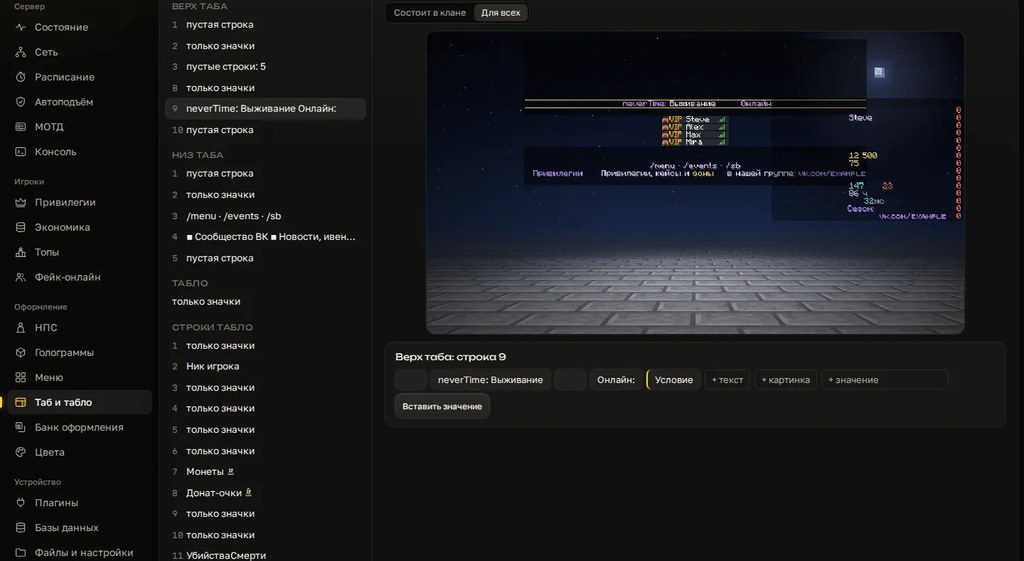
In Cloud Panel the tab list and scoreboard are edited with a live preview: header, player list, the scoreboard at spawn. Colors, gradients, SmallCaps and placeholders show up immediately, the way they look in game. No guessing how a gradient will land, no reload after every letter.
The panel writes the TAB config for you and leaves neighboring lines alone. Every edit is logged and any of them can be rolled back, restoring the file byte for byte. You can try it without installing: on the panel page the tab and scoreboard builder runs in the browser, and you take the finished TAB config for free.
You can build the tab header and footer in the free TAB generator, and the sidebar in the scoreboard generator. Both give you a config you can drop straight into the plugin.
Checklist
- Only one plugin writes the tab list and scoreboard.
- The header and footer are short, with online count and website visible.
- Prefixes come from LuckPerms via a placeholder, not retyped by hand.
- Group order in the list is configured.
- The scoreboard is enabled and has 15 lines or fewer.
- Placeholders show data, PAPI expansions are downloaded.
- Tested on the client version most of your players use.
/tab reloaddone after the edit, the console is clean.
Want to build your tab list and scoreboard with a live preview on your own server? Try it free for 3 days, no card needed.
Do not want to put all of this together by hand?
We have been building server builds, plugins and websites for Minecraft servers since 2022. A ready-made solution goes onto your hosting in an evening, and we install it for free.