DeluxeMenus: how to build a Minecraft server menu without fighting YAML
From the first file to a working button: where DeluxeMenus keeps its configs, how slots are counted, how to bind commands to clicks and why a menu silently refuses to open.
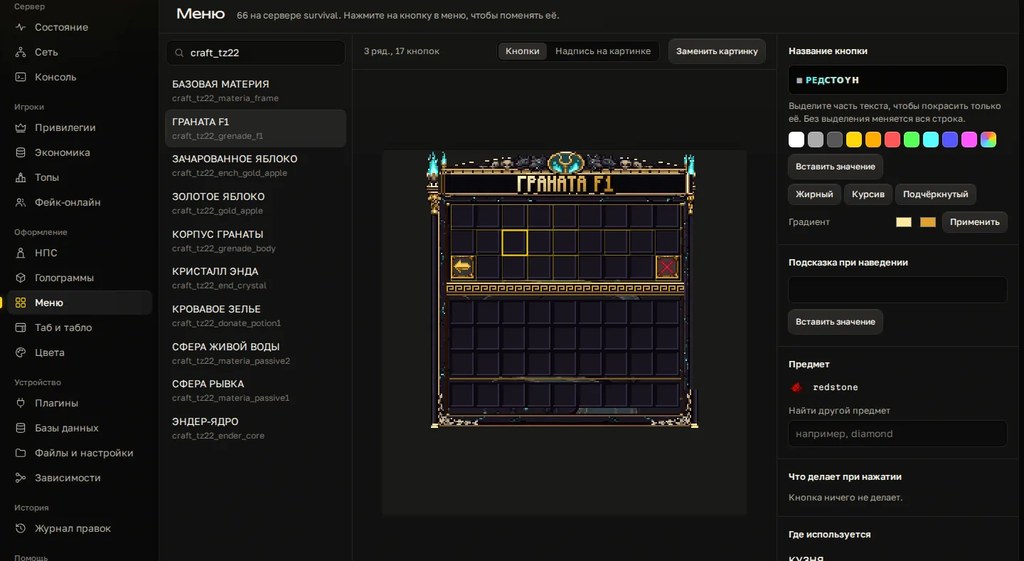
Players open menus more often than any other command: /menu, donations, warps, kits. DeluxeMenus lets you build them without a developer, but you pay in YAML. One stray space and the menu silently fails to load. Here is a working order of steps: how to build a menu by hand, where it usually breaks, and how to do the same thing faster.
What to install
- DeluxeMenus for your server version. Drop the jar into
pluginsand do a full restart. - PlaceholderAPI. Without it, placeholders like
%player_name%or a balance in the item lore stay as plain text. - PlaceholderAPI expansions for the placeholders you use:
/papi ecloud download Player,/papi ecloud download Vault, then/papi reload.
New to plugins? Read our guide to essential plugins first: install order and the usual conflicts are covered there.
How the files are laid out
After the first start you get plugins/DeluxeMenus/config.yml and a gui_menus folder. Keep each menu in its own file inside that folder. The catch: the plugin only loads a file that is registered in config.yml:
gui_menus:
  main_menu:
    file: main_menu.yml
  shop_menu:
    file: shop_menu.yml
main_menu is the internal name. You open the menu with /dm open main_menu and refer to it by that name from other menus.
Your first menu, step by step
- Create
plugins/DeluxeMenus/gui_menus/main_menu.yml. - Set the title, the size and the command players will type to open it.
- Describe the buttons under
items. - Register the file in
config.ymlas shown above. - Run
/dm reloadand check the console right away.
menu_title: '&8Main menu'
open_command:
- menu
- m
size: 27
items:
  spawn:
    material: COMPASS
    slot: 11
    display_name: '&aGo to spawn'
    lore:
    - '&7Teleport to the spawn point'
    left_click_commands:
    - '[player] spawn'
    - '[close]'
  shop:
    material: EMERALD
    slot: 13
    display_name: '&eShop'
    left_click_commands:
    - '[openguimenu] shop_menu'
  profile:
    material: head-%player_name%
    slot: 15
    display_name: '&b%player_name%'
    lore:
    - '&7Balance: &f%vault_eco_balance_formatted%'
The profile button shows the player's own head and balance, via the Player and Vault expansions.
How slots are numbered
Menu size is a multiple of nine, from 9 to 54, so one to six rows. Slots start at zero and go left to right, top to bottom. The formula: row × 9 + column, both counted from zero.
| Row | Slots | Middle of the row |
|---|---|---|
| 1 | 0–8 | 4 |
| 2 | 9–17 | 13 |
| 3 | 18–26 | 22 |
| 4 | 27–35 | 31 |
| 5 | 36–44 | 40 |
| 6 | 45–53 | 49 |
You don't need one item per slot for a glass border. One item can fill several slots from a list: slots: [0, 1, 2, 3, 4, 5, 6, 7, 8].
What a click can do
| Action | What it does |
|---|---|
[player] command | runs a command as the player, written without the slash |
[console] command | runs a command from the console: give items, ranks, money |
[message] text | sends the player a chat message |
[openguimenu] name | opens another menu by its internal name |
[close] | closes the menu |
[refresh] | redraws the menu, for example after a purchase |
Action lists are split by mouse button: left_click_commands, right_click_commands, and click_commands, which fires on any click. Actions run top to bottom.
A VIP-only button
Visibility is controlled by view_requirement. If the requirement fails, the button is hidden. So that regular players see a locked icon instead of an empty slot, put a second item in the same slot with a lower priority. In DeluxeMenus the item with the smaller priority number wins.
  vip_kit:
    material: DIAMOND
    slot: 22
    priority: 1
    display_name: '&6VIP kit'
    view_requirement:
      requirements:
        is_vip:
          type: has permission
          permission: group.vip
    left_click_commands:
    - '[player] kit vip'
    - '[close]'
  vip_kit_locked:
    material: BARRIER
    slot: 22
    priority: 2
    display_name: '&cVIP only'
group.vip is the permission LuckPerms grants automatically to every member of the vip group. Setting up donor ranks is covered in our LuckPerms guide. The kit is claimed as the player, not from the console, so Essentials checks the cooldown and the kit permission itself.
For paid buttons there is click_requirement with the has money type and a deny_commands list that tells the player they can't afford it. That needs Vault and an economy plugin.
Common mistakes
- The menu isn't registered under
gui_menus. The file is in the folder, but/dm opensays the menu doesn't exist. - Tabs instead of spaces. YAML rejects tabs. Indent with spaces only, and consistently.
- An apostrophe inside single quotes. A line like
'Don't'breaks the whole file. Double the apostrophe or use double quotes. - A slash after
[player]. Write[player] spawn, with no slash. - Two items in one slot with no
priority. The wrong one shows up and it looks like the requirement is broken. - A placeholder shows as raw text. The PlaceholderAPI expansion isn't downloaded, or the name has a typo.
- A material name from an older version. The plugin logs an error and the button disappears. Use names for your game version.
- The open command is taken. If another plugin already owns
/menu, its menu opens instead. Pick another command or remove the duplicate. - A full server
/reload. For menus,/dm reloadis enough.
Before /dm reload, paste the file into any online YAML validator. It's quicker than hunting for a stray space in the console log.The faster way
In Cloud Panel you build menus with the mouse. Drag an item into a slot, click it, and set the name, the lore and what happens on click: nothing, close the menu, or run a command. Rows are a toggle, and you remove an item by dragging it out of the window. Colors are previewed the way they look in game.
The panel writes the DeluxeMenus file for you and leaves every other line untouched. Every edit goes into a log, and a rollback restores the file byte for byte. You can bind the menu to an NPC click from the same app. You can also try the builder without installing anything: on the panel page you assemble a menu in the browser and take the finished DeluxeMenus config for free.
Want to try it without installing anything? The free DeluxeMenus menu generator builds buttons in the browser and gives you ready YAML.
Checklist
- DeluxeMenus and PlaceholderAPI are installed, the needed expansions are downloaded.
- Every menu is registered under
gui_menusinconfig.yml. sizeis a multiple of nine, slots are counted from zero.[player]commands have no slash.- Locked buttons use
view_requirementplus a fallback item in the same slot. - The console is clean after
/dm reload. - The menu is tested by a regular player, not an operator.
- A working copy of the file is saved before the next edit.
Want to build menus with the mouse on your own server? Try it free for 3 days, no card needed.
Do not want to put all of this together by hand?
We have been building server builds, plugins and websites for Minecraft servers since 2022. A ready-made solution goes onto your hosting in an evening, and we install it for free.