NPCs and holograms on a Minecraft server: Citizens and DecentHolograms step by step
Place an NPC with a skin and a click command in Citizens, add holograms with DecentHolograms and tie it all to your menus. Commands included, plus the mistakes people hit most.
A spawn with no NPCs and no signs looks like an empty lot: players don't know where to go or what the server even offers. Citizens plus DecentHolograms fixes that for free. Step by step below: an NPC with a skin and a click command, a hologram above it, and a jump into a menu. How to fit all of it into one visual style is covered in our server design guide.
What to install
- Citizens, a build for your server version.
- DecentHolograms for floating text.
- PlaceholderAPI if holograms should show live data: online count, balance, time. The expansion for the online count is
/papi ecloud download Server, then/papi reload.
After installing, do a full restart, not /reload.
An NPC in Citizens, step by step
- Stand where the NPC should be and face the right way.
/npc create &eTraderspawns it at your position. Color codes in the name work. - The new NPC is selected automatically. To select another, look at it and type
/npc select, or use/npc select id. IDs are listed in/npc list. - Skin from a premium account name:
/npc skin Notch. - To make the NPC turn its head toward players:
/npc lookclose. - Command on click:
/npc command add -p warp shop. The-pflag means "run as the player". Without it the command runs from the console, and the player name goes in as<p>:/npc command add give <p> bread 1. - Move the NPC to you:
/npc tphere. Rename it:/npc rename new_name. - Delete the selected NPC:
/npc remove.
There are two ways to open a DeluxeMenus menu on click: as the player with the menu's open command, /npc command add -p menu, or from the console, /npc command add dm open shop_menu <p>. Building the menu itself is covered in our DeluxeMenus guide.
All NPCs live in one file, plugins/Citizens/saves.yml.
Don't edit saves.yml while the server is running. On shutdown Citizens writes its own copy over yours and your edit is gone. Stop first, edit, then start.Holograms in DecentHolograms
- Stand where the text should float.
/dh create spawn_info &6Welcomecreates a hologram with its first line. - Add a line to page one:
/dh line add spawn_info 1 &7Online: &f%server_online%. - Replace line two:
/dh line set spawn_info 1 2 &aNew text. - A line that shows an item instead of text: use
#ICON: DIAMONDas the line content. - Move the hologram to you:
/dh movehere spawn_info. - List and delete:
/dh list,/dh delete spawn_info.
Each hologram is its own file in plugins/DecentHolograms/holograms/, with all lines, the display range and the update interval. After editing files by hand, run /dh reload.
DecentHolograms also has pages and click actions per page: a message, a command, a jump to the next page. That's how you build a guide hologram players flip through by clicking. /dh help shows the full syntax.
Text above an NPC: two options
| Citizens lines | DecentHolograms hologram | |
|---|---|---|
| How | the /npc hologram command on the selected NPC | a separate hologram above its head |
| Follows the NPC | yes | no, it stays put |
| Styling | text lines | items, pages, clicks, placeholders |
| Use when | the NPC walks or gets moved a lot | the NPC stands at spawn for good |
Place the hologram above the NPC's name tag, or the lines will overlap. If you don't need the name above the head, give the NPC a short name and put everything into the hologram.
Common mistakes
- The skin didn't load. Skins come from Mojang by the name of a premium account. If no such account exists, you get the default skin.
- Clicking does nothing. The command was added as console but needs a player, like
warp shop. Add-por pass the name with<p>. - "No permission" for the player. With
-pthe command runs with the player's own permissions. Grant the permission to the players' group instead of running the command as an operator. - The hologram is left floating. You moved the NPC, but the DecentHolograms hologram stayed where it was. Move both.
- A placeholder shows as text. PlaceholderAPI or the expansion is missing.
- Lag around spawn. Dozens of holograms with placeholders refreshing too often. Raise the update interval where data rarely changes.
- Editing
saves.ymlon a live server, as above.
The faster way
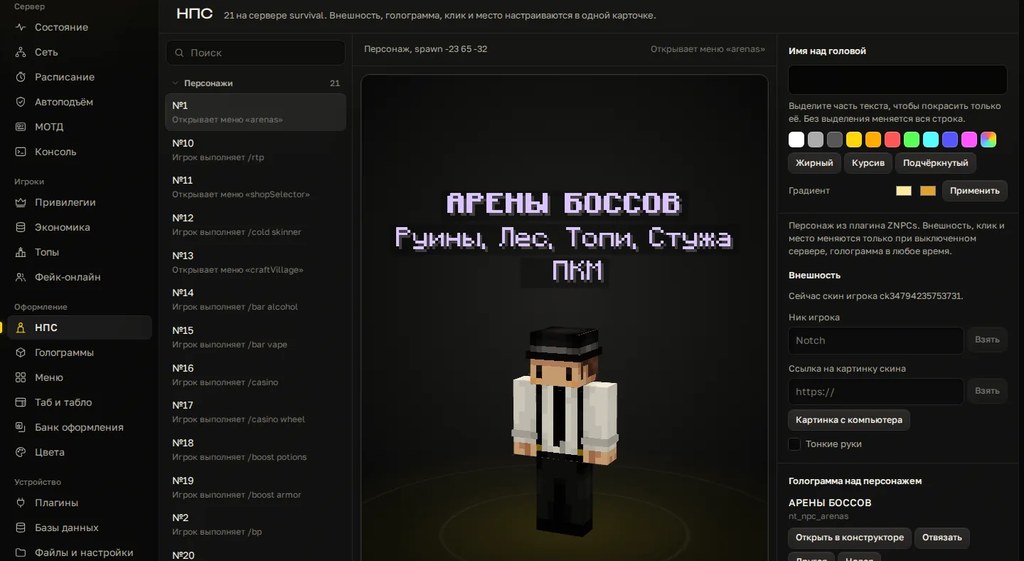
In Cloud Panel a character lives in one card: a skin from a player name or a picture, a colored name, a hologram and a menu on click. The left side shows how players will see it in game. No IDs, flags or command order to remember.
Holograms are edited in a builder: lines, colors, a command on click. The panel knows the Citizens and DecentHolograms config keys and shows them as forms. Every edit is logged, and a rollback restores the file byte for byte. You can try the hologram builder without installing anything: it runs in the browser on the panel page, and you take the finished DecentHolograms config for free.
It helps to sketch hologram lines first in the free hologram generator: you see how the text will look in game and get a DecentHolograms config right away.
Checklist
- Citizens, DecentHolograms and PlaceholderAPI are installed, the console is clean after start.
- Every NPC has a clear name and one click action.
- Commands that need a player are added with
-por<p>. - Permissions for those commands are granted to the players' group.
- Holograms sit above name tags without overlapping them.
- Placeholders show data, not text with percent signs.
- Tested by a regular player, not an operator.
saves.ymland the holograms folder are backed up.
Want to build NPCs and holograms with the mouse on your own server? Try it free for 3 days, no card needed.
Do not want to put all of this together by hand?
We have been building server builds, plugins and websites for Minecraft servers since 2022. A ready-made solution goes onto your hosting in an evening, and we install it for free.