Pterodactyl, Multicraft or Cloud Panel: which one to manage your server with
These three panels solve different problems. Where Pterodactyl and Multicraft are stronger, where Cloud Panel is, and how to choose based on what you actually do with your server every day.
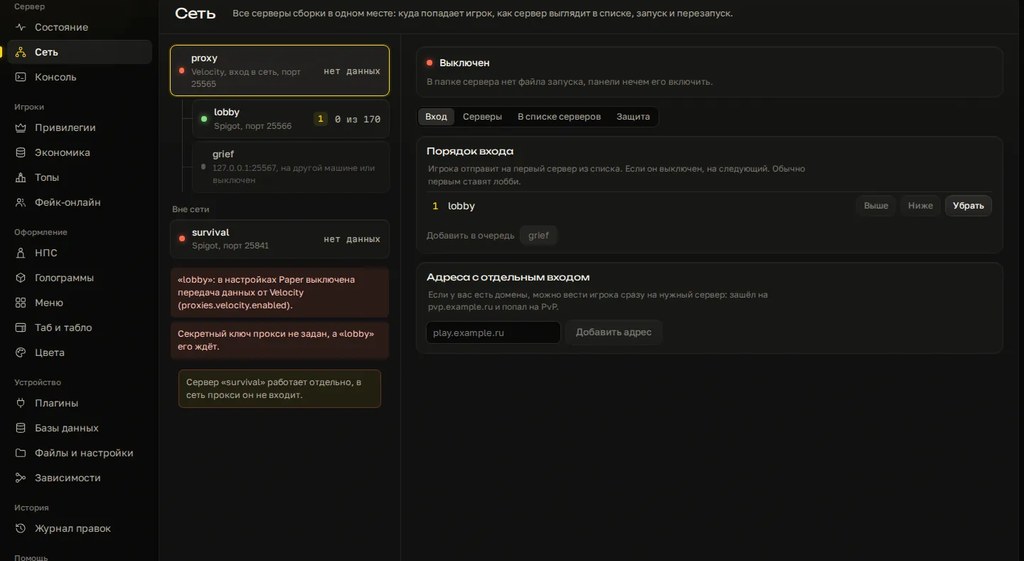
A control panel is how you touch your server every day: start, console, files, configs. Pterodactyl and Multicraft are proven web panels, and many hosts run on them. Cloud Panel is our own program and it solves a different problem. Here's an honest look at who's stronger where.
Each one in short
Pterodactyl
A free, open-source panel. It's a web panel plus the Wings daemon on each machine, with servers running in Docker containers. It handles many servers across many machines, users with fine-grained per-server permissions, schedules for commands, restarts and backups, built-in backups, a file manager and a browser console. Ready-made templates for different games are called eggs.
The price is setup. You need Linux, Docker, a web server, a database and someone to set it all up and keep it updated. The interface is English by default.
Multicraft
A commercial panel built specifically for Minecraft and around for many years. You install it on your own machine or get it with your hosting, since many hosts give it to their customers. Web interface, multiple users with roles per server, a task scheduler, built-in FTP, console and chat in the browser. Check the license terms on the official site.
Both Pterodactyl and Multicraft work at the file level: you edit plugin configs as text, and the panel doesn't know what's inside.
Cloud Panel
A Windows program. You install it on your computer and connect it to a server on a Linux VPS or on that same PC: a wizard walks you through and gives you a short code. Its strength isn't power and files but what's inside the server: builders for NPCs, holograms, menus, tab and scoreboard, every shop price in one list, settings of nine popular plugins as forms with plain-language labels, and an edit log with byte-for-byte rollback. Status, online count, power, console, machine load and cards for each server in a network are there too.
Side by side
| Pterodactyl | Multicraft | Cloud Panel | |
|---|---|---|---|
| What it is | web panel, open source | web panel, commercial | Windows program |
| Price | free; you pay for the machine and setup time | paid license or bundled with hosting | 1,999 RUB per 30 days, 3 days free |
| Setup | Linux, Docker, database, web server | your own install or ready at the host | installer and connection wizard |
| Many machines and servers | yes, that's what it's for | yes | one server per subscription, network servers as cards |
| Team access | users with per-server permissions | users with roles | up to two of the owner's computers |
| From a phone | yes, browser | yes, browser | no, desktop program |
| Console, files, power | yes | yes | yes |
| Schedules and world backups | yes | has a scheduler | no |
| Plugin configs | text editor | text editor | forms for nine plugins plus builders |
| Edit rollback | no | no | log, any edit byte for byte |
Choosing step by step
- Where the server lives. A regular Minecraft host already gave you a panel: its own, Pterodactyl or Multicraft. No reason to replace it; the question is whether it's enough. Cloud Panel is built for a Linux VPS or your own PC. If you don't have access to the machine, test the connection during the three free days before paying.
- How many servers and people. A hosting company, dozens of servers, a team with different permissions: that's Pterodactyl. It was made for exactly this.
- Who will run Linux. If nobody on your side can, don't install Pterodactyl yourself. Get hosting with a panel included.
- Where it hurts. If the pain is restarting a crashed server and uploading a file, any web panel will do. If the pain is a hundred configs, menus, holograms and prices where every edit breaks indentation, that's the job for Cloud Panel.
- Do you need a phone. If you manage on the go, you need a web panel. Cloud Panel doesn't run on phones.
Can you use them together
Their jobs barely overlap. A web panel handles the machine: create a server, give the team access, run scheduled backups. Cloud Panel handles the contents: NPCs, menus, tab, prices, plugin settings. The technical side depends on how machine access is set up. If your server runs on a VPS under Pterodactyl, test the Cloud Panel connection during the trial.
Common mistakes when choosing
- Pterodactyl for one small server without Linux skills. A month goes into Docker and certificates instead of players.
- Choosing by screenshots rather than by what you'll actually do every day.
- Expecting a web panel to help with configs. It opens the file, but indentation and keys are still on you.
- Panel access for moderators instead of in-game permissions. More on that in the article on phone management and moderators.
- A panel on the internet with a weak password. Turn on two-factor login if the panel supports it.
Where Cloud Panel wins and where it doesn't
Stronger: everything inside the server. Cloud Panel knows the keys of Citizens, DecentHolograms, DeluxeMenus, Essentials, ItemsAdder, LuckPerms, MythicMobs, TAB and WorldGuard, shows an in-game style preview, changes prices across all shops in one list and rolls back any edit.
Weaker: no web or phone access, none of the hosting-panel features like team access and schedules, and it runs only on Windows. If that's what you need, go with Pterodactyl or Multicraft and add Cloud Panel once configs become the bottleneck.
Checklist
- You know where the server runs and whether you have access to the machine.
- You counted servers and people who need access.
- Someone will maintain Linux, or you picked hosting with a panel.
- You wrote down what you do with the server every day.
- You decided whether you need phone access.
- Configs and server design are covered separately if that's the main pain.
- Moderators get in-game permissions, not panel access.
Try Cloud Panel on your own server: 3 days free.
Do not want to put all of this together by hand?
We have been building server builds, plugins and websites for Minecraft servers since 2022. A ready-made solution goes onto your hosting in an evening, and we install it for free.