Updating plugins without breaking things, and backing up your Minecraft server
What to back up, how to copy a world on a running server, what order to update plugins in, and how to roll back in five minutes when something goes wrong.
You update a plugin and permissions are gone. Shop prices reset to zero. The server won't start after a new core version. These stories usually end with "do we have a backup?" Here's a routine where the answer is always yes and a rollback takes minutes.
What goes into a backup
| What | Where | Why |
|---|---|---|
| Worlds | world, world_nether, world_the_end and other world folders | builds, inventories, player data |
| Plugins | the whole plugins/ folder | jars, configs and data plugins keep in files |
| Server settings | server.properties, bukkit.yml, spigot.yml, Paper's config/ folder | without them a restored server behaves differently |
| Lists | ops.json, whitelist.json, banned-players.json, banned-ips.json | ops, whitelist, bans |
| External database | MySQL or MariaDB | permissions, economy, logs, if plugins store them there |
The last row is the one people forget. Copying folders doesn't include the database; you dump it separately. LuckPerms can also save itself to a file with /lp export backup; the file lands in the plugin's folder.
Copying a world without corrupt chunks
If you copy a world folder while the server is writing to it, some chunks in the copy end up half written. There are two safe ways.
- Stop the server, copy, start it again. Reliable, but players get kicked.
- Without stopping. Turn off saving, flush everything to disk, copy, turn saving back on.
save-off
save-all flush
(copy the files)
save-on
An example for Linux, with the server in /opt/mc and backups going to /backup:
cd /opt/mc
tar -czf /backup/mc-$(date +%F-%H%M).tar.gz world world_nether world_the_end plugins config *.yml *.json server.properties
mysqldump -u mc -p luckperms > /backup/luckperms-$(date +%F).sql
find /backup -name 'mc-*.tar.gz' -mtime +14 -delete
The last line deletes archives older than two weeks, or one day the disk fills up. Put the script in cron for the night and backups show up on their own.
A copy on the same disk isn't a backup. If the disk dies or the host shuts down your VPS, both copies go. At least once a week, move an archive to another machine or to cloud storage.
And test a restore at least once: unpack the archive into a separate folder and start it on another port. A backup nobody ever restored is a hope, not a backup.
Updating a plugin step by step
- Read the changelog on the plugin page. Look for anything about config, database, minimum server or Java version.
- Check compatibility with your game version and server software.
- Back up. At least the plugin folder and the jar, ideally everything.
- Try it on a copy first if you have one. A local server on your PC with the same plugins is enough.
- Stop the server, remove the old jar, add the new one. Two versions of the same plugin in the folder give an
Ambiguous plugin namewarning, and there's no telling which one loads. - Start it and read the console: plugin errors, messages about migrating config or data.
- Compare the config. Plugins usually add new keys themselves, but not always. Check against the default config of the new version.
- Join as a regular player and make sure the plugin does its job. As op you won't see half the permission problems.
If you can't stop the server right now, Bukkit has an update folder: a jar placed in plugins/update replaces the one with the same file name in plugins on the next start. The file name has to match the current one.
Updating a lot at once
- Libraries other plugins depend on come first: ProtocolLib, Vault, PlaceholderAPI.
- Then one or two plugins at a time with a check in between. Install ten and something breaks, and you're back to guessing.
- Moving to a new game version is its own project. Almost every plugin updates at once, so do it on a copy. The world gets converted, and the only way back to the old version is a backup.
Common mistakes
- Updating right before an event. Friday night, peak online, no time to roll back.
/reloadinstead of a restart. Old classes stay in memory and the plugin acts weird until the next restart.- Backing up only the world. Permissions, economy and settings live in
plugins/. - Forgetting the database. Files rolled back, MySQL still on the new version's format.
- A jar from a random site. An "update" from a forum or chat can carry someone else's code. Get it from the official page: SpigotMC, Modrinth, Hangar, the author's repository.
- Rolling back just the jar. The new version already converted its config or database, and the old one can't read them. Roll back the plugin folder and database together.
Doing the same thing faster
Cloud Panel doesn't back up worlds; use the archives above for that. Its job is configs and server power.
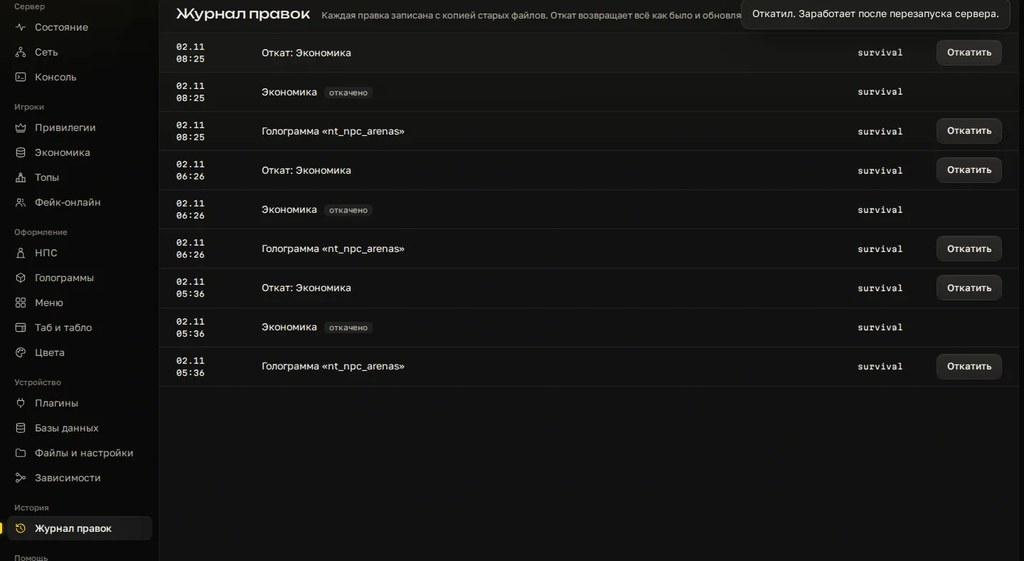
- Edit log. Every config edit made through the panel is recorded and any of them can be rolled back, with the file restored byte for byte. When you tune a new config after an update, you don't need to copy it by hand before each change.
- Toggle a plugin with a button. The jar moves to a separate folder and back. New version misbehaving: switch it off, restart, sort it out calmly.
- Power and console. Start, stop and restart with buttons, console right there. You see at once whether the server came up and how many players are online.
Checklist
- The backup has worlds,
plugins/, server settings, lists and a database dump. - The world was copied after a stop or with
save-offandsave-all flush. - A copy exists off the server machine.
- A restore has been tested at least once.
- You read the plugin's changelog.
- The old jar is gone and there's only one new one.
- The console is clean after startup.
- Tested as a regular player, not as op.
- The update isn't at peak hours or right before an event.
Try the rollback log and one-click plugin toggling on your own server: 3 days free.
Do not want to put all of this together by hand?
We have been building server builds, plugins and websites for Minecraft servers since 2022. A ready-made solution goes onto your hosting in an evening, and we install it for free.