LuckPerms: permissions and donor ranks on a Minecraft server from scratch
Building a donor rank ladder in LuckPerms: inheritance, weights, prefixes, timed ranks from your store and permission checks. So VIPs don't fly in the mines and Legends can open their kit.
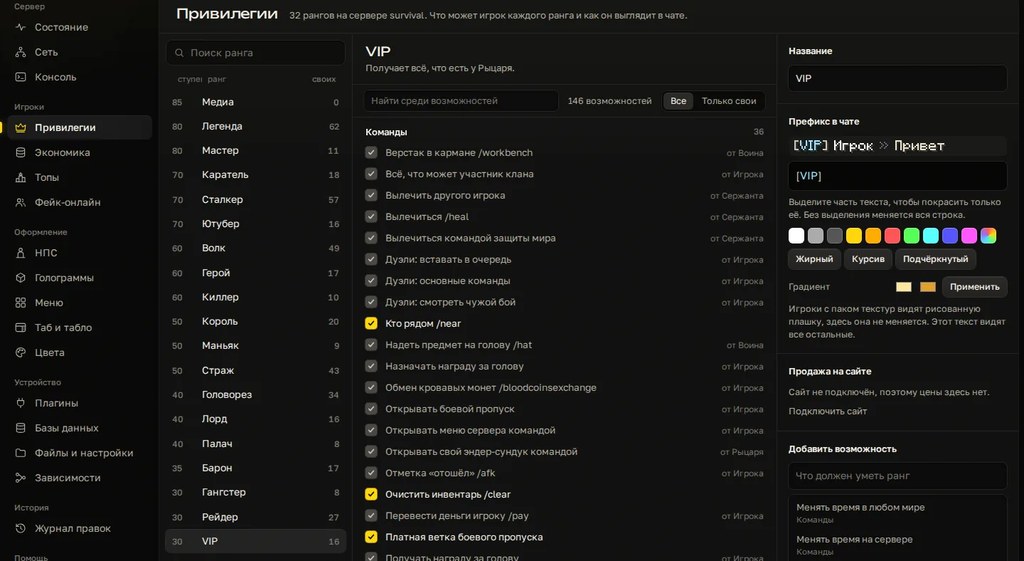
Donations sell ranks, and ranks run on permissions. Get the groups wrong, and a month later your VIPs are flying in the mines while the player who bought Legend can't open their kit. Below we build a donor rank ladder in LuckPerms from scratch. The very basic commands are in our article on claims and permissions; this one goes further.
Plan it on paper first
| Group | Weight | Inherits | Adds |
|---|---|---|---|
| default | 0 | nothing | spawn, home, teleport requests |
| vip | 10 | default | own kit, three homes |
| premium | 20 | vip | flight |
| legend | 30 | premium | heal and feed commands |
| helper | 100 | default | mute, kick, reports |
Each donor group inherits the one below it. That way legend only lists what's new at that level, and everything beneath comes for free. Staff is a separate branch off default: a helper shouldn't get donor perks for free, and a donor shouldn't get mute.
Groups and inheritance
/lp creategroup vip
/lp creategroup premium
/lp creategroup legend
/lp group vip parent add default
/lp group premium parent add vip
/lp group legend parent add premium
/lp group vip setweight 10
/lp group premium setweight 20
/lp group legend setweight 30
Weight matters when a player has several groups: LuckPerms uses it to decide which group ranks higher and whose permissions win a conflict. Bigger number, higher group. Leave gaps between weights like above, so you can slot a new rank in later.
Permissions
/lp group default permission set essentials.home true
/lp group default permission set essentials.tpa true
/lp group vip permission set essentials.kits.vip true
/lp group vip permission set essentials.sethome.multiple.vip true
/lp group premium permission set essentials.fly true
/lp group legend permission set essentials.heal true
/lp group legend permission set essentials.feed true
The number of homes for essentials.sethome.multiple.vip is set in the Essentials config under sethome-multiple, and the vip kit is defined there too. To take away an inherited permission, set it to false in the group that shouldn't have it.
Not sure which permission a command checks? Turn on /lp verbose on, run the command as a regular player and watch the checks appear in chat. Turn it off with /lp verbose off.
Prefixes
/lp group vip meta setprefix 10 "&e[VIP] "
/lp group premium meta setprefix 20 "&b[Premium] "
/lp group legend meta setprefix 30 "&6[Legend] "
The first number is the prefix priority, not the group weight. When a player has several groups, the prefix with the highest priority is shown. Keep priority equal to weight and you won't get confused. The quotes are required, otherwise the trailing space is lost.
A prefix doesn't show up anywhere on its own. In chat it's displayed by a chat plugin through Vault, in the tab list by the TAB plugin or the PlaceholderAPI placeholder %luckperms_prefix%. Hooking it into the tab list is covered in our TAB and scoreboard guide.
Timed ranks and store delivery
/lp user Steve parent addtemp vip 30d accumulate
/lp user Steve parent add legend
/lp user Steve parent remove vip
addtemp grants a group for a period: 30d, 12h, 1w. The accumulate flag matters for renewals: if the player already has a timed vip, the new 30 days are added to what's left. Without it, a repeat purchase may not extend the rank, and the buyer ends up in your support chat. For a permanent rank use plain parent add.
Your donation store grants the rank with the same command over RCON: the product holds a command with a player-name placeholder, and each store service has its own syntax. We covered automatic delivery in our article on server websites.
Grant donor ranks withparent addoraddtemp, neverparent set.setremoves every other group the player has: your helper buys VIP and stops being a helper.
Tracks for upgrades
/lp createtrack donate
/lp track donate append vip
/lp track donate append premium
/lp track donate append legend
/lp user Steve promote donate
promote moves the player one step up the track and removes the previous step. Handy for an "upgrade to the next rank" product. The reverse is demote.
Server networks
If you run a lobby and survival behind Velocity or BungeeCord, connect LuckPerms on every server to one MySQL or MariaDB database. That's storage-method in config.yml. The default is H2, a local file, so each server keeps its own separate copy of permissions.
In the same config.yml, give each server its own name in the server key. Then you can grant a permission on just one of them:
/lp group premium permission set essentials.fly true server=survivalTo push an edit from one server to the others right away, enable messaging-service.
How to check
/lp user Steve info: the player's groups and timed expiries./lp user Steve permission check essentials.fly: whether the permission is there and where it comes from./lp editor: a web editor via a link in chat. After saving, it gives you a command to run on the server to apply the changes.- A test account without operator. An operator sees everything and proves nothing.
Common mistakes
- Permissions granted to individual players. A month later nobody remembers who has what. Groups only.
- A group that doesn't inherit default. The VIP buyer loses
/spawnand/home. - No weights set. LuckPerms treats the wrong group as primary.
- Equal prefix priorities. A player with two groups gets the one you didn't expect.
parent setfor donations. Other groups vanish, staff included.addtempwithoutaccumulate. Renewals don't stack.*for admins. It opens literally everything, including commands nobody needs. Grant a list instead.- H2 on a network. VIP in the lobby, regular player in survival.
The faster way
Groups and permissions themselves are easiest to manage with the commands above or with /lp editor. Cloud Panel takes care of everything around them. The console is right there, no SSH: lp commands go straight from the app. LuckPerms config.yml opens as a form, so you don't hunt for keys in the file. The prefixes you set show up in the tab list and scoreboard with a live preview. The donation menu is put together in a visual builder. And every file edit is logged and can be rolled back byte for byte.
Checklist
- The rank ladder is planned on paper before the first command.
- Donor groups inherit each other, the lowest one inherits default.
- Staff is a separate branch.
- Weights and prefix priorities are set and match.
- Timed ranks use
accumulate, neverparent set. - On a network: one database and a server name in
config.yml. - Every rank is tested with a non-operator account.
Want your console, tab list and donation menu in one window? Try it free for 3 days, no card needed.
Do not want to put all of this together by hand?
We have been building server builds, plugins and websites for Minecraft servers since 2022. A ready-made solution goes onto your hosting in an evening, and we install it for free.